

Continuous delivery for mobile apps is the practice of automating build, test, code signing, and distribution processes so your app is always in a releasable state, regardless of app store constraints or platform fragmentation. Unlike web deployments, mobile CI/CD produces signed binaries (.ipa for iOS, .apk or .aab for Android) that pass through mandatory store reviews before reaching users. Tools like Fastlane, Bitrise, and Expo Application Services (EAS Build) have made this process repeatable and reliable. Teams that shift from quarterly releases to continuous delivery cycles see measurable gains in user retention, since Android apps retain only 2.1% of users after 30 days without frequent, quality-driven updates.
What is continuous delivery for mobile apps?
Mobile continuous delivery is an automated pipeline that builds, cryptographically signs, tests, and distributes mobile apps to internal testers and app stores, keeping the app always releasable. The industry term is mobile CI/CD, where CI stands for continuous integration and CD covers continuous delivery or deployment. Both terms are used interchangeably in practice, though they describe slightly different scopes.
The core distinction from web CI/CD is the binary artifact. Web deployments push code changes directly to servers. Mobile pipelines produce immutable signed binaries that go through Apple App Store or Google Play review before any user downloads them. That review window, typically 24 to 48 hours for most submissions, shapes every release decision your team makes.
Mobile app deployment is also a repeatable operational cycle, not a one-time market event. Every release involves build automation, signing, testing, and distribution across development, staging, and production environments. Teams that treat deployment as a structured process rather than a sprint-end scramble ship faster and with fewer critical bugs reaching production.
The business case is direct. Frequent, high-quality updates improve engagement and retention. A mobile CD pipeline makes those updates predictable, not heroic.
What are the core stages of a mobile CD pipeline?
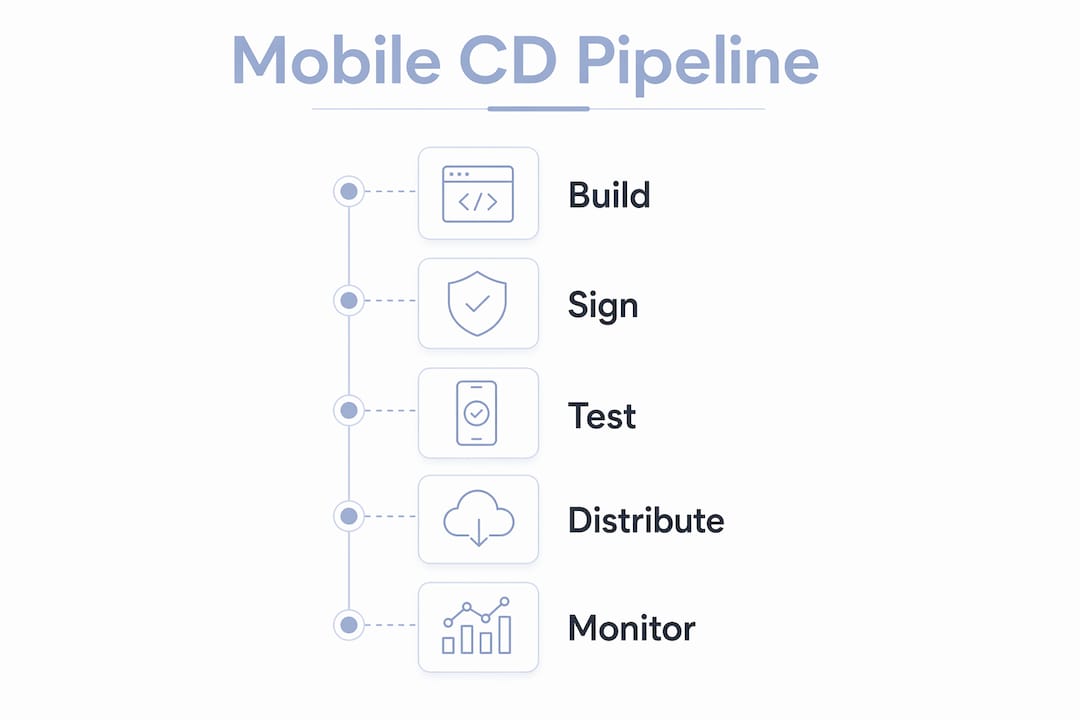
A production-grade mobile continuous delivery pipeline moves through five distinct stages, each with mobile-specific requirements that differ from standard web workflows.
-
Source code management and trigger configuration. Every pipeline starts with a Git event, typically a push to a feature branch, a pull request merge, or a tag on the main branch. Tools like Bitrise and GitHub Actions listen for these events and trigger the pipeline automatically. Branching strategy matters here: teams using trunk-based development ship more frequently than those with long-lived feature branches.
-
Platform-specific artifact builds. The pipeline compiles platform-specific binaries. iOS produces a .ipa file; Android produces an .apk or .aab. Tools like Fastlane and Bitrise facilitate this automation, including dependency caching to cut build times significantly. Separating debug and release build configurations in the pipeline prevents test builds from accidentally reaching production.
-
Automated testing across multiple layers. This stage runs unit tests, integration tests, and UI tests. Real-device testing through device farms like Firebase Test Lab or BrowserStack catches device-specific rendering and performance issues that emulators miss. Store review times run 24 to 48 hours, so catching bugs before submission is far cheaper than a rejected binary or a post-release hotfix.
-
Code signing. iOS requires a valid certificate and provisioning profile. Android requires a keystore. Both are time-sensitive assets that expire and must be stored securely. Code signing is the most common failure point in mobile CI/CD pipelines, and a single expired certificate can freeze your entire release process.
-
Distribution to testers and stores. Internal builds go to TestFlight for iOS or Firebase App Distribution for Android. Production releases go through store submission, either manually or via automated store APIs. Many teams add a human approval gate before production submission, which is a valid practice since continuous delivery does not mandate full automation of store submission.
Pro Tip: Set up automated versioning in your pipeline using Fastlane’s increment_version_number action. Manual version bumps are a common source of rejected submissions and wasted review cycles.
How does continuous delivery for mobile differ from web CI/CD?
The structural differences between mobile and web continuous delivery are significant enough to require purpose-built pipelines, not adapted web workflows.
| Dimension | Mobile CD | Web CD |
|---|---|---|
| Artifact type | Signed binary (.ipa, .apk, .aab) | Code deployed directly to server |
| Release gate | App store review (24 to 48 hours) | Instant or near-instant |
| Rollback | No instant rollback; requires forward fix | Revert deployment in minutes |
| Update control | User decides when to update | Server update is immediate for all users |
| Signing requirement | Cryptographic certificates required | Not applicable |
| Platform fragmentation | Hundreds of device and OS combinations | Browser compatibility testing |

Mobile pipelines differ structurally from web because signed binaries undergo review and user download delays that web deployments never face. This shapes every design decision in your pipeline, from how you handle hotfixes to how you structure your testing strategy.
Rollback is the sharpest difference. On the web, a bad deploy rolls back in minutes. On mobile, you cannot force users to downgrade. Full rollback is complex because users control their own update timing and stores do not support instant version reversals. Your only real option is a forward fix: submit a corrected build, wait for review, and hope your phased rollout caught the issue before it reached your full user base.
Platform fragmentation adds another layer of complexity. A web app runs in a browser. A mobile app runs on thousands of device and OS combinations, each with different screen sizes, hardware capabilities, and OS behaviors. Mobile CD pipelines must address device fragmentation with more rigorous testing-first strategies than web CI/CD requires.
Pro Tip: Use mobile proxies during automated testing to simulate real-world network conditions across geographies. This catches latency-sensitive bugs that only appear on slower connections, which is particularly relevant for app testing in 2026 where global user bases are the norm.
What are the best tools and practices for mobile CD pipelines?
Building a reliable mobile continuous delivery pipeline comes down to a focused set of decisions made early. Here is what actually works in production environments.
-
Automate builds before anything else. The highest-value first step is a reproducible, automated build. Before you add testing or signing automation, get your build running consistently on a CI server. This single step eliminates “works on my machine” failures and gives your team a stable foundation.
-
Manage code signing with a vault. Signing certificates and provisioning profiles expire annually. Store them in a secrets manager like HashiCorp Vault, AWS Secrets Manager, or Bitrise’s built-in code signing management. A certificate expiring on a Friday afternoon before a major release is a preventable crisis.
-
Use Fastlane for automation glue. Fastlane’s lanes connect build, test, signing, and distribution steps into a single command. Its match action manages code signing across teams without sharing raw certificates. EAS Build from Expo handles the same workflow for React Native and Flutter projects with less configuration overhead.
-
Implement feature flags from day one. Feature flags decouple deployment from feature activation. Phased rollouts and feature flags let you disable a problematic feature without submitting a new build. Tools like LaunchDarkly and Firebase Remote Config integrate directly into mobile pipelines.
-
Run tests on real devices. Emulators catch logic errors. Real devices catch the crashes that matter to users. Firebase Test Lab and AWS Device Farm provide access to physical device matrices at scale. Even running your critical user flows on 10 real devices catches more production bugs than 100 emulator runs.
-
Build incrementally. Many teams adopt a start-simple approach, beginning with build automation and adding testing and store integration as pipeline maturity grows. Trying to automate everything on day one creates fragile pipelines that teams abandon.
Pro Tip: Separate your signing configuration from your build configuration in Fastlane. This lets you reuse the same build lane for debug, beta, and production, swapping only the signing identity. It cuts your Fastfile complexity by half and makes debugging signing failures much faster.
How do phased rollouts and OTA updates reduce release risk?
Phased rollouts and over-the-air updates are the two primary tools for managing release risk in mobile continuous delivery. They serve different purposes and work best when used together.
A phased rollout releases a new build to a percentage of your user base before expanding to everyone. iOS App Store phased rollouts run over a fixed seven-day schedule controlled by Apple, with automatic percentage increases each day. Google Play gives you manual control: you set the percentage and expand it yourself based on crash rates and user feedback. This difference matters operationally. Android teams can pause a rollout the moment a spike in crashes appears. iOS teams must halt the rollout manually and submit a fix, since Apple’s schedule does not pause automatically.
The practical benefit is early signal detection. A bug that affects 1% of users is far easier to contain than one that reaches your full install base. Monitoring crash rates, ANR rates, and user reviews during the rollout window gives you the data to decide whether to expand or halt.
Over-the-air updates address a different problem: the review cycle itself. OTA updates allow React Native and Flutter apps to bypass app store review for JavaScript and asset fixes, enabling near-instant critical updates. This is particularly valuable for fixing a broken API call or a UI rendering error without waiting 24 to 48 hours for store approval. OTA updates do not cover native code changes, so they complement rather than replace the standard release pipeline.
The combination of phased rollouts and OTA updates gives mobile teams a meaningful degree of control that the binary-and-review model would otherwise deny them. Neither tool eliminates release risk entirely, but together they shrink the blast radius of any given release significantly.
Key takeaways
Continuous delivery for mobile apps requires automated pipelines, secure code signing, and phased distribution strategies to keep apps releasable and reduce the risk of every release.
| Point | Details |
|---|---|
| Mobile CD definition | Automated pipelines build, sign, test, and distribute apps to keep them always releasable. |
| Code signing is critical | Certificates expire annually; store them in a vault to prevent pipeline failures. |
| Mobile vs. web rollback | Mobile has no instant rollback; forward-fix strategies and phased rollouts are the practical alternative. |
| Start simple | Automate builds first, then layer in testing and store integration as pipeline maturity grows. |
| OTA updates fill the gap | React Native and Flutter apps can push JavaScript fixes without waiting for store review. |
Why most teams get mobile CD wrong in the first six months
Teams adopting mobile continuous delivery for the first time almost always make the same mistake: they try to replicate their web CI/CD pipeline with minimal changes. I have seen this pattern repeatedly. The result is a pipeline that technically runs but breaks constantly on code signing, produces inconsistent builds across environments, and gets abandoned after the third production incident.
The mindset shift that actually works is treating mobile CD as a discipline built around constraints, not a convenience layer on top of your existing tools. The app store review cycle is not a problem to solve. It is a fixed constraint to design around. Once you accept that, decisions like feature flags, phased rollouts, and OTA update strategies stop feeling like workarounds and start feeling like first-class pipeline components.
The other thing I would tell any team starting out: do not underestimate code signing. It is the most unglamorous part of mobile CD and the one most likely to cause a release freeze at the worst possible moment. Automate it, vault your certificates, and document the renewal process before you need it under pressure.
Smaller, more frequent releases also change team morale in ways that are hard to quantify but very real. When a release is a routine event rather than a high-stakes deployment, engineers make better decisions. They ship smaller changes, write better tests, and catch issues earlier. That cultural shift is as valuable as any tooling improvement.
For teams building cross-platform apps with Flutter or React Native, the mobile app MVP development steps you establish early will define your delivery velocity for years. Get the pipeline right before the user base grows.
— Christopher
How Mediakliq can help you ship faster and more reliably
Mediakliq builds and manages mobile CI/CD pipelines for teams that need production-grade delivery without the overhead of building it from scratch.
With over 75 completed projects and more than 100,000 project hours across Flutter, React Native, and native iOS and Android, Mediakliq handles the full delivery lifecycle. That includes automated build configuration, secure code signing vault setup, TestFlight and Firebase App Distribution integration, and staged rollout monitoring. If your team is spending more time managing releases than shipping features, Mediakliq’s mobile development services are built to fix that. You can also explore Mediakliq’s software management work to see how these pipelines perform at scale.
FAQ
What is continuous delivery for mobile apps?
Continuous delivery for mobile apps is an automated pipeline that builds, signs, tests, and distributes mobile applications so the app is always in a releasable state. It covers the full cycle from source code commit to app store submission, including code signing and phased rollout management.
How is mobile CI/CD different from web CI/CD?
Mobile CI/CD produces signed binaries that require app store review before reaching users, while web CI/CD deploys code changes directly to servers with near-instant availability. Mobile pipelines also face platform fragmentation, user-controlled update timing, and no instant rollback capability.
What tools are used in mobile continuous delivery pipelines?
Fastlane, Bitrise, and EAS Build are the most widely used tools for automating mobile CD pipelines. They handle build automation, code signing, testing, and distribution to TestFlight, Firebase App Distribution, and production app stores.
Can you roll back a mobile app release instantly?
No. Mobile app rollbacks cannot be performed instantly because users control their own update timing and stores do not support forced version reversals. Teams use forward-fix strategies, phased rollouts, and feature flags to contain the impact of a bad release.
What are OTA updates and when should you use them?
Over-the-air updates let React Native and Flutter apps push JavaScript and asset fixes directly to users without waiting for app store review. They are best used for critical bug fixes that do not involve native code changes, reducing the impact of the standard 24 to 48 hour review cycle.