

Cross-platform mobile app development is defined as writing a single codebase that compiles or runs on iOS, Android, and sometimes web or desktop without duplicating logic per platform. Frameworks like React Native and Flutter lead this space, each using a fundamentally different strategy: React Native bridges JavaScript to native components, while Flutter renders its own UI through a custom engine. Tools like Expo layer on top of React Native to automate native project configuration. Understanding how these systems function under the hood is what separates developers who pick the right stack from those who spend months debugging the wrong one.
How cross-platform mobile apps work at the architecture level
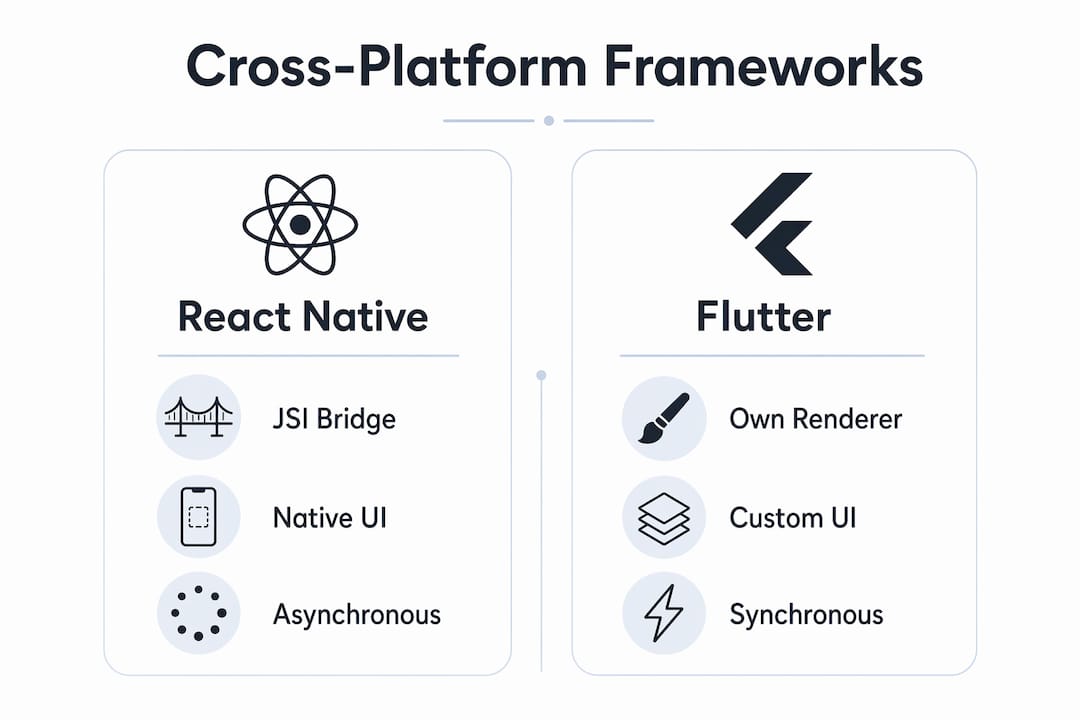
The two dominant models in cross-platform mobile development are the bridge model and the custom renderer model. React Native and Flutter represent each approach, and the gap between them is wider than most job postings suggest.
React Native: from async bridge to JSI and Fabric
React Native’s original architecture serialized JavaScript calls into JSON, passed them across an asynchronous bridge to native modules, and waited for a response. That design worked for simple apps but introduced measurable lag in scroll-heavy or animation-heavy interfaces. The legacy async bridge caused serialization and queue bottlenecks that limited performance in scenarios requiring synchronous native access. That bottleneck is why the new architecture exists.
The new architecture replaces the JSON bridge with the JavaScript Interface (JSI), a C++ layer that lets JavaScript hold direct references to native objects without serialization. Paired with JSI is Fabric, the new rendering system that updates native views based on React component trees synchronously. JSI and Fabric provide tighter, synchronous integration to reduce latency and improve UI fluidity. For teams building gesture-driven or animation-heavy apps, this architectural shift is not optional. It is the baseline for competitive performance.
Flutter: owning the entire rendering stack
Flutter takes a different approach entirely. Rather than bridging to native UI widgets, it ships its own rendering engine and draws every pixel itself. The Impeller rendering engine compiles shaders ahead of time at build, rather than at runtime, which eliminates the frame drops users notice as “jank” during first interactions. Impeller works on raster threads to submit GPU commands via Metal on iOS and Vulkan or OpenGL on Android.

The practical result is that Flutter’s UI behavior is consistent across platforms because the framework owns the entire rendering stack, with less variability than native UI widgets across platforms. A button in Flutter looks and behaves identically on a Pixel 8 and an iPhone 15 because Flutter drew it, not the OS. That consistency is a genuine architectural advantage, not a marketing claim.
| Framework | Rendering approach | Native UI widgets | Performance model |
|---|---|---|---|
| React Native (new arch) | JSI + Fabric, bridges to native views | Yes | Synchronous native calls via JSI |
| Flutter | Custom Impeller engine, draws own pixels | No | Precompiled shaders, GPU-direct rendering |
Pro Tip: If your app requires platform-specific UI conventions (like iOS share sheets or Android bottom navigation patterns), React Native’s bridge to native components gives you those for free. Flutter requires custom implementation or third-party packages for the same behavior.
How does Expo simplify native project management?
Expo is a managed framework built on top of React Native that solves one of the most time-consuming problems in cross-platform mobile development: keeping native project files in sync with your JavaScript configuration. Without Expo, every new native dependency requires manually editing "Info.plist, AndroidManifest.xml`, Gradle files, and Xcode project settings. One missed entry breaks a CI build or an App Store submission.
Expo addresses this through three mechanisms that work together:
- Config plugins modify parsed native project files declaratively. A plugin receives the current state of
Info.plistorAndroidManifest.xmlas a JavaScript object, applies changes, and writes the result back. The config plugin system makes native changes declarative, repeatable, and reviewable within CI/CD pipelines, which eliminates configuration drift across team members. - Autolinking scans your
node_modulesfor native packages and links them automatically during the prebuild step. You add a package topackage.json, runnpx expo prebuild, and the native project reflects the change. No manual Gradle or CocoaPods edits required. - The prebuild pipeline generates the entire native iOS and Android project from your
app.jsonand installed plugins. This means your native project is a build artifact, not a source file. You can delete it and regenerate it deterministically at any point.
The downstream benefit for teams is significant. Expo config plugins enable repeatable and automatable native project builds, which is critical for large teams and continuous integration environments. A developer joining the project runs one command and gets a correctly configured native project. No tribal knowledge required.
Pro Tip: Treat your generated ios/ and android/ directories as build artifacts and add them to .gitignore when using Expo’s managed workflow. This forces all native configuration through config plugins, making your setup auditable and reproducible across machines.
For teams evaluating technology stack options for new mobile projects, Expo’s prebuild model is worth understanding before committing to a bare React Native setup.
What are the performance trade-offs in cross-platform apps?
Performance in cross-platform apps is not a single variable. It breaks down into rendering performance, bridge latency, and startup time, and each framework handles these differently.
The core tension in React Native’s legacy model was the JS-to-native boundary. Every gesture event, every scroll position update, and every animation frame had to cross that asynchronous bridge. JSI and Fabric tackle this by enabling synchronous calls and concurrent rendering synchronization, which is the architectural change that makes React Native viable for complex, gesture-driven interfaces in 2026.
Flutter’s primary performance challenge was historically shader compilation jank. When a user triggered a new UI transition for the first time, the GPU had to compile the shader on the fly, causing a visible stutter. The Impeller engine moves shader compilation to build time, providing predictable frame rates and significantly reducing UI jank. The result is that Flutter apps tend to feel smoother on first run than React Native apps that haven’t been profiled and optimized.
Key performance considerations for technical decision-makers:
- Gesture and animation workloads favor React Native’s new architecture with JSI, which allows Reanimated 3 and Gesture Handler to run on the UI thread without bridge overhead.
- Consistent visual fidelity across devices favors Flutter, since it controls every pixel and is not subject to OS-level widget rendering differences.
- Startup time in both frameworks is affected by JavaScript bundle size (React Native) or Dart AOT compilation (Flutter). Both support code splitting and lazy loading to mitigate this.
- Native module performance in React Native depends on whether the module has been updated to support the new architecture. Legacy modules using the old bridge still carry the serialization cost.
The honest trade-off is this: cross-platform development gives you roughly 80 to 90 percent of native performance at a fraction of the development cost. The remaining gap matters only for a narrow category of apps, such as real-time video processing or high-frequency sensor data. For the vast majority of business applications, the gap is imperceptible to users.
How does cross-platform development improve efficiency across devices?
The efficiency argument for cross-platform mobile development is straightforward: a single codebase enables sharing nearly 100% of app code, including UI, for rapid deployment across mobile platforms and sometimes web or desktop. That code reuse directly reduces the engineering hours required to build and maintain a product.
The practical benefits compound over time:
- Bug fixes apply once. A logic error in your data layer gets fixed in one place and the fix ships to both iOS and Android in the same release.
- Feature parity is automatic. New features appear on both platforms simultaneously because they share the same implementation.
- Navigation, storage, and native API access are handled through unified libraries. React Navigation, AsyncStorage, and Expo’s sensor APIs work identically across platforms.
- Deployment can extend to web and desktop. React Native Web and Flutter Web allow portions of the same codebase to run in a browser, though with varying degrees of fidelity.
Businesses deploying on iOS and Android simultaneously reduce duplicated bugs and align features across devices, which translates directly to lower QA costs and faster release cycles. For startups and product teams with limited engineering capacity, this is the primary reason to choose cross-platform over native. Reviewing mobile app MVP development steps alongside your framework choice helps align your build strategy with your release timeline.
Key takeaways
Cross-platform mobile apps function by using a single codebase that either bridges to native OS components via JSI and Fabric (React Native) or renders UI independently through a custom engine (Flutter), with tools like Expo automating native project configuration for reproducible builds.
| Point | Details |
|---|---|
| React Native new architecture | JSI replaces the async bridge, enabling synchronous native calls and eliminating serialization bottlenecks. |
| Flutter rendering model | Impeller precompiles shaders at build time, delivering consistent frame rates without runtime GPU jank. |
| Expo config plugins | Declarative native file modifications make builds reproducible and CI-friendly without manual project edits. |
| Performance trade-offs | Bridge latency, shader compilation, and startup time each require different mitigation strategies per framework. |
| Code reuse efficiency | A single codebase cuts bug-fix time, enforces feature parity, and accelerates simultaneous iOS and Android releases. |
Why I’d start every new project on the new architecture today
I’ve watched teams spend three months debugging scroll performance issues that were entirely caused by the legacy React Native bridge. The fix was migrating to the new architecture, which they could have done from day one if they’d understood what JSI and Fabric actually change. The lesson is not that React Native is slow. The lesson is that the old bridge was a known bottleneck, and starting a project on it in 2026 is a deliberate choice to inherit a solved problem.
My strong recommendation for any new React Native project is to enable the new architecture from initialization. The common mobile app development mistakes I see most often involve teams treating native project files as hand-edited source files rather than generated artifacts. Expo’s prebuild model solves this, and the teams that resist it usually do so because they don’t fully understand what config plugins replace.
Flutter is the right call when your team prioritizes visual consistency and you’re willing to implement platform-specific UI patterns manually. React Native is the right call when your team is already strong in JavaScript and you need tight integration with platform-native components. Neither framework is universally superior. The decision should come from your team’s existing expertise and your app’s specific UI requirements, not from benchmark articles written for a different use case than yours.
The ecosystem maturity gap between the two frameworks has narrowed considerably. Both have production-grade tooling, large communities, and active core teams. What hasn’t changed is that the wrong architecture choice compounds over time. Get it right at the start.
— Christopher
Build your cross-platform app with Mediakliq
Mediakliq specializes in cross-platform mobile app development using React Native and Flutter, with deep experience in modern build tooling including Expo’s config plugin and prebuild pipeline. Whether you’re starting a new product or migrating a legacy codebase to the new architecture, Mediakliq brings over 100,000 project hours of practical delivery experience to your project. The team handles the full lifecycle from architecture decisions through deployment and maintenance, so you’re not left managing native configuration drift or performance regressions alone. Explore Mediakliq’s mobile and web development services or review high-performance app architectures to see how the right technology choices translate into measurable product outcomes.
FAQ
How do cross-platform apps differ from native apps?
Cross-platform apps use a single codebase to run on multiple operating systems, while native apps are written separately for each platform using OS-specific languages like Swift or Kotlin. The trade-off is development speed and cost versus maximum platform-specific performance.
What is the JavaScript Interface (JSI) in React Native?
JSI is a C++ layer that replaces the legacy async JSON bridge, allowing JavaScript to call native code directly without serialization. This enables synchronous native access and is the foundation of React Native’s new architecture with Fabric.
Does Flutter use native UI components?
Flutter does not use native UI widgets. It draws every pixel through its own Impeller rendering engine, which means UI looks identical across platforms but requires manual implementation of platform-specific design patterns.
What does Expo add to React Native development?
Expo provides config plugins, autolinking, and a prebuild pipeline that declaratively generate and modify native iOS and Android project files. This eliminates manual native configuration and makes builds reproducible across machines and CI environments.
When should you choose React Native over Flutter?
Choose React Native when your team has strong JavaScript expertise and your app requires tight integration with platform-native UI components. Choose Flutter when visual consistency across platforms is the priority and your team can work in Dart.