

The mobile app lifecycle is defined as the structured sequence of stages that takes a mobile application from initial concept through planning, design, development, testing, deployment, and ongoing maintenance. Every successful app on the Apple App Store or Google Play Store follows this process, whether its creators planned it deliberately or stumbled through it by accident. Following a structured lifecycle helps teams manage risks and avoid the budget overruns that sink so many promising projects. If you are building your first app or planning your next one, understanding this lifecycle is the single most important thing you can do before writing a line of code.
What is the mobile app lifecycle, stage by stage?
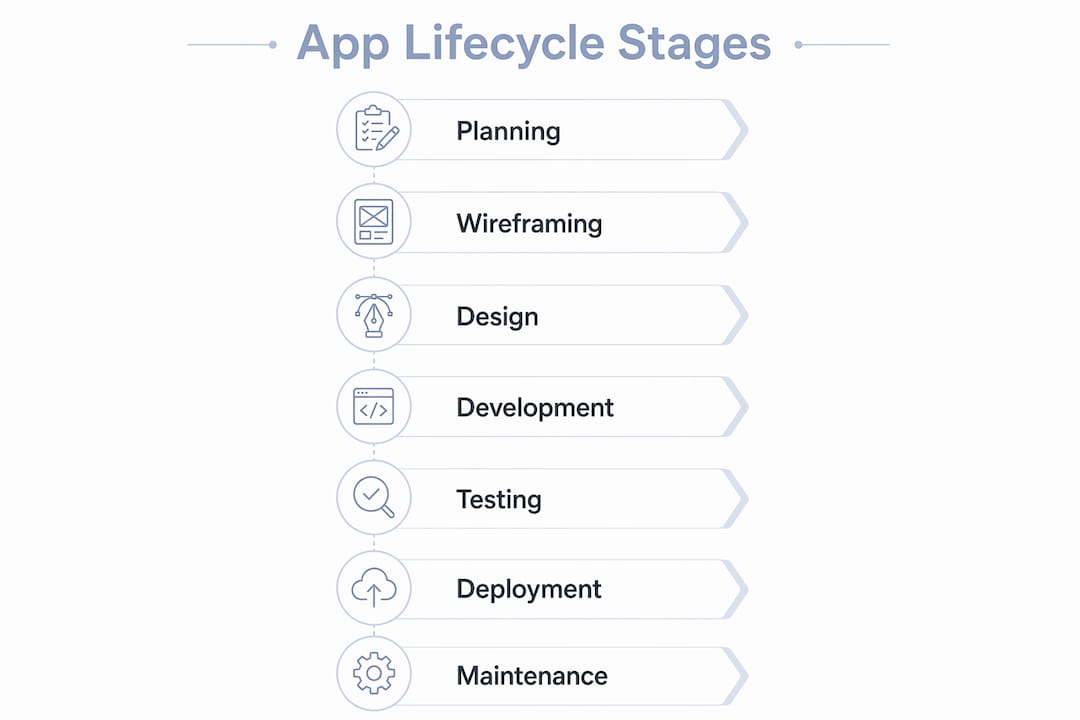
The mobile app lifecycle involves nine core stages: planning, wireframing, feasibility assessment, prototyping, design, development, testing, deployment, and maintenance. Each stage has a distinct purpose, and skipping any one of them creates compounding problems later. Here is how each phase works in practice.
1. Discovery and Planning
This stage defines your app’s purpose, target users, and core features. You conduct market research, analyze competitors, and write a product requirements document. Teams that skip this phase often build the wrong product entirely. A solid discovery phase typically takes two to four weeks for a mid-sized project.

2. Wireframing and Prototyping
Wireframes are low-fidelity sketches of your app’s screens. Prototypes are clickable mockups that simulate user flows. Tools like Figma and Adobe XD are standard here. Skipping prototypes leads to costly rework and low adoption rates after launch. Prototyping catches navigation problems before a single developer touches the codebase.
3. UI/UX Design
Designers translate wireframes into polished visual interfaces. This stage covers color systems, typography, iconography, and interaction patterns. iOS and Android each have their own design languages. Apple’s Human Interface Guidelines and Google’s Material Design are the two frameworks every mobile designer must know.
4. Development
Developers build the app using native or cross-platform tools. Native iOS apps use Swift or Objective-C in Xcode. Native Android apps use Kotlin or Java in Android Studio. Agile sprints typically run in two-week cycles, giving teams clear goals and frequent deliverables. This iterative rhythm catches integration problems early instead of at the end of a six-month build.
5. Testing
Quality assurance covers functional testing, performance testing, and user experience validation. Testing on real devices is critical because emulators do not fully replicate real-world conditions. A test plan should cover at least a dozen device and OS combinations before submission.
6. Deployment and Launch
App store submission requires compliance with strict platform guidelines and full metadata preparation. Apple’s review process averages one to three days. Google Play’s review is typically faster but still mandatory. Both platforms require screenshots, descriptions, privacy policy links, and age ratings.
7. Post-Launch Maintenance
Post-launch maintenance includes regular updates, performance fixes, and adapting to OS changes. When Apple releases a new iOS version, apps that are not updated quickly lose compatibility and ratings. This phase never truly ends for a live product.
Pro Tip: Build your maintenance budget into the project from day one. Most teams allocate 15–20% of the initial development cost per year for ongoing support.
How does mobile app development differ from desktop software?
Mobile app development differs fundamentally from desktop software development in ways that reshape every stage of the lifecycle. Mobile apps must account for device compatibility, screen sizes, network conditions, and platform-specific requirements that desktop software simply does not face. Many developers coming from a web-only background underestimate these differences and pay for it during testing and launch.
The key mobile-specific challenges include:
- Device fragmentation. Android alone runs on thousands of device models from manufacturers like Samsung, Google, and OnePlus, each with different screen resolutions and hardware specs.
- Battery and sensor integration. Mobile apps interact with GPS, accelerometers, cameras, and biometric sensors. Each integration adds testing complexity and potential failure points.
- App store gatekeeping. Desktop software ships directly to users. Mobile apps must pass Apple App Store or Google Play Store review before anyone can download them.
- Update mechanics. Desktop updates can be pushed silently. Mobile updates require user action and app store approval, which means bugs live in production longer.
- Network variability. Mobile users switch between Wi-Fi, 4G, and 5G constantly. Apps must handle degraded connections gracefully, which desktop apps rarely need to consider.
“Mobile development differs fundamentally from desktop software due to fragmentation, battery and sensor integration, and app store rules. Many developers from web-only backgrounds overlook these factors entirely.” — Trinergy Digital
Understanding these constraints is not optional. They shape your design decisions, your testing matrix, and your deployment timeline from the very first sprint.
What are the best practices and pitfalls at each stage?
The difference between a successful app and an abandoned one usually comes down to discipline at each lifecycle stage. Most failures are predictable and preventable.
Best practices that consistently produce better outcomes:
- Conduct user interviews during discovery, not surveys alone. Real conversations surface problems that checkbox surveys miss.
- Use Figma or Adobe XD to build interactive prototypes before development starts. Share them with five to ten real users and watch where they get confused.
- Adopt continuous integration tools like GitHub Actions or Bitrise to automate builds and catch broken code immediately.
- Test on physical devices using services like BrowserStack or UAT testing platforms that support real-device bug reporting across multiple OS versions.
- Plan your App Store Optimization (ASO) strategy before launch, not after. Keywords in your title and description directly affect discoverability.
Common pitfalls that derail projects:
- Locking down the feature list too early. User needs shift during development. Agile sprints exist precisely to accommodate that reality.
- Ignoring platform guidelines until submission. Apple rejects apps for dozens of reasons, from privacy label errors to UI violations. Read the guidelines during design, not after development.
- Treating launch as the finish line. Apps that stop receiving updates within six months of launch see measurable drops in ratings and retention.
- Underestimating mobile proxy testing for apps that handle location data or region-specific content. Network simulation matters more than most teams realize.
Pro Tip: Set up crash reporting with a tool like Firebase Crashlytics on day one of development. You want data flowing before launch, not after your first one-star review.
For a deeper look at mistakes that cost teams months of rework, the Mediakliq guide on common development mistakes covers the patterns that show up repeatedly across projects.
Which tools and platforms support each lifecycle phase?
The right tools reduce friction at every stage. Choosing them before the project starts is part of good lifecycle management.
| Lifecycle Stage | Recommended Tools | Key Benefit |
|---|---|---|
| Planning and Discovery | Jira, Notion, Miro | Centralized requirements and sprint tracking |
| Design and Prototyping | Figma, Adobe XD | Collaborative design with real-time feedback |
| Native Development | Android Studio, Xcode | Full access to platform APIs and debugging |
| Cross-Platform Development | Flutter, React Native | Single codebase for iOS and Android |
| Testing | BrowserStack, Firebase Test Lab | Real-device testing across OS versions |
| CI/CD | GitHub Actions, Bitrise | Automated builds and deployment pipelines |
| Post-Launch Analytics | Firebase Analytics, Mixpanel | User behavior tracking and crash reporting |
Cross-platform frameworks like Flutter and React Native have changed the economics of mobile development. A single Flutter codebase can target iOS, Android, and web simultaneously, which cuts development time significantly for startups with limited budgets.
Continuous delivery is the other major efficiency lever. Teams that automate their build and release pipelines ship updates faster and with fewer regressions. The Mediakliq guide on continuous delivery for mobile walks through how to set this up from scratch. For app lifecycle management at scale, combining Jira for sprint tracking with Firebase for post-launch monitoring gives you full visibility from planning through production.
Key takeaways
A well-executed mobile app lifecycle is the foundation of every app that survives past its first year in the market.
| Point | Details |
|---|---|
| Lifecycle has nine stages | From planning through maintenance, each stage has a distinct role and cannot be safely skipped. |
| Agile sprints reduce risk | Two-week sprint cycles surface integration problems early instead of at the end of a long build. |
| Mobile differs from desktop | Device fragmentation, app store rules, and sensor integration create challenges desktop development does not face. |
| Real-device testing is non-negotiable | Emulators miss real-world performance and compatibility issues that only physical devices reveal. |
| Maintenance is a permanent phase | Post-launch updates, OS compatibility fixes, and user feedback loops keep an app viable long-term. |
Where most developers get the lifecycle wrong
I have reviewed dozens of mobile projects over the years, and the pattern is almost always the same. Teams treat the lifecycle as a checklist rather than a feedback system. They move through planning, design, and development in a straight line, then hit testing and realize the architecture does not support a feature they promised in the pitch deck.
The discovery phase is where the real work happens. Not the glamorous work, but the work that determines whether the rest of the project makes sense. I have seen teams spend three weeks on a beautiful UI before anyone confirmed the core user problem was real. That is not a design failure. It is a process failure.
The maintenance phase gets even less respect. Most first-time founders budget for launch and nothing else. Then iOS 19 ships six months later, and their app breaks in three places. Suddenly they are scrambling for a developer at a premium rate because they did not plan for the work that never stops.
My honest advice: treat the lifecycle as a loop, not a line. Every maintenance cycle feeds back into planning. User feedback from version 1.0 should directly shape the feature set for version 2.0. The teams that build apps people actually use long-term are the ones who never stop running the process.
— Christopher
Build your app the right way with Mediakliq
If you are ready to move from understanding the lifecycle to executing it, Mediakliq brings the full process under one roof.
Mediakliq’s team has delivered over 75 projects and logged more than 100,000 project hours across mobile, web, and AI-driven applications. Their mobile and web development services cover every lifecycle stage, from discovery and UX/UI design through deployment and ongoing maintenance. Whether you are building a cross-platform app in Flutter or a native iOS product in Swift, Mediakliq’s engineers have done it before. Explore their completed project portfolio to see what full-lifecycle development looks like in practice, or reach out directly to discuss your project scope.
FAQ
What is the mobile app lifecycle in simple terms?
The mobile app lifecycle is the complete sequence of stages an app goes through from initial idea to active use and ongoing updates. It covers planning, design, development, testing, deployment, and maintenance.
How long does the full mobile app lifecycle take?
A typical mobile app takes three to nine months from discovery to launch, depending on complexity. Post-launch maintenance continues indefinitely as long as the app remains live.
What is the most important stage of the mobile app lifecycle?
Discovery and planning is the most critical stage because decisions made here shape every phase that follows. Errors in requirements or scope at this stage are the most expensive to fix later.
How does app lifecycle management differ for iOS vs. android?
iOS development uses Swift and Xcode, while Android development uses Kotlin or Java in Android Studio. Submission processes, review timelines, and design guidelines differ between Apple App Store and Google Play Store, which affects deployment planning for both platforms.
Do cross-platform apps follow the same lifecycle as native apps?
Yes, cross-platform apps built with Flutter or React Native follow the same lifecycle stages. The difference is that a single codebase targets both iOS and Android, which reduces development time but still requires platform-specific testing and separate app store submissions.