

A mobile app performance testing workflow is the structured process of defining, executing, and validating performance tests across real devices and simulated conditions to ensure app responsiveness, stability, and resource efficiency. Most developers treat testing as a final step before release. That instinct costs teams weeks of rework. A well-structured mobile app performance testing workflow catches regressions early, maps directly to user-facing KPIs, and runs on real hardware rather than emulators. The mobile app lifecycle shapes when and how each test phase runs, making lifecycle awareness a prerequisite for any serious QA strategy.
What core steps define a mobile app performance testing workflow?
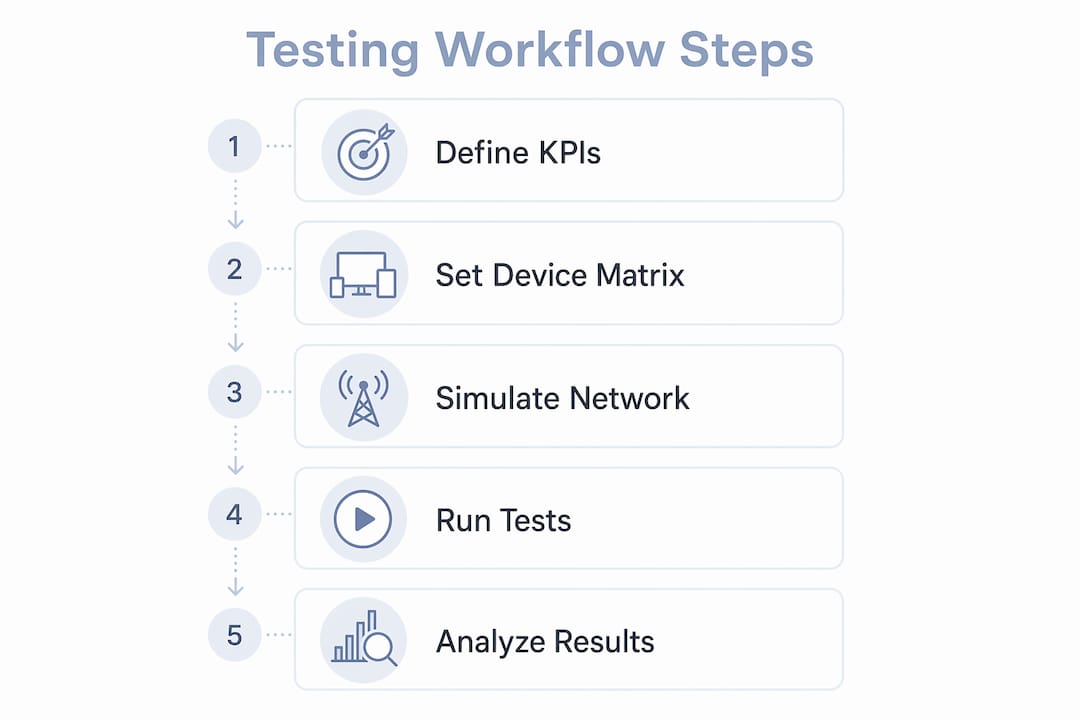
An effective performance workflow follows six steps: define KPIs, prioritize user scenarios, select test types, choose tools and environments, run and analyze tests, then fix and revalidate. Each step feeds the next. Skipping KPI definition means you have no pass/fail criteria. Skipping regression validation means you ship fixes you have not confirmed.
The six steps break down like this:
- Define KPIs and success criteria. Set measurable targets: app launch time under 2 seconds, frame rate above 60 fps, memory usage below a defined ceiling. Without these numbers, “performance” is subjective.
- Prioritize user scenarios. Rank flows by frequency and business impact. A checkout flow matters more than an account settings screen.
- Select test types. Load tests measure behavior under expected traffic. Stress tests push the app past normal limits. Soak tests run for extended periods to surface memory leaks.
- Choose tools and environments. Match tools to test goals. Device farms cover hardware diversity. Automation frameworks handle repeatable execution. Network simulators replicate real-world conditions.
- Run tests and collect data. Execute under controlled conditions. Capture metrics indexed by build identifier so you can compare across releases.
- Fix issues and run regression validation. Confirm that the fix resolves the regression without introducing new ones.
| Step | Purpose | Key output |
|---|---|---|
| Define KPIs | Set measurable pass/fail criteria | Performance budget document |
| Prioritize scenarios | Focus effort on high-impact flows | Ranked scenario list |
| Select test types | Match test to risk profile | Test plan with load, stress, soak |
| Choose tools | Align tooling to environment needs | Tool configuration spec |
| Run and analyze | Collect build-indexed metrics | Regression report |
| Fix and retest | Confirm resolution and stability | Signed-off regression baseline |
Pro Tip: Index every metric by build identifier from day one. Without build-tagged data, you cannot tell whether a performance drop appeared in this sprint or three releases ago.

How to integrate realistic device and network conditions
Testing on a phone does not equal performance testing. Real performance validation requires measuring launch times, scroll jank, memory growth, and battery draw under actual hardware and network conditions. Emulators miss OEM-specific rendering bugs, hardware sensor behavior, and thermal throttling that only appear on physical devices.
Real device testing surfaces issues that emulators hide:
- OEM-specific defects. A Samsung device running One UI may render animations differently than a stock Android device at the same API level.
- Battery drain patterns. Background location polling or excessive wake locks only show their true cost on physical hardware with real battery chemistry.
- Memory leak detection. Emulators often have more available RAM than the median user device. Memory pressure issues stay invisible until you test on constrained hardware.
- Hardware sensor interactions. Camera, GPS, and accelerometer behaviors vary by chipset and cannot be accurately replicated in software.
Network simulation is equally important. Most teams use throttling tools to simulate 3G or LTE conditions. Capturing live HAR files of actual network traffic and replaying them under device constraints is more accurate than software-only throttling. This method reveals real API latency, retry behavior, and timeout handling that throttling alone misses.
Pro Tip: Build a device matrix that reflects your actual user base. Pull device model data from your analytics platform and prioritize the top 10 devices by session volume. Testing on flagship hardware when 60% of your users run mid-range devices produces misleading results.
Understanding how mobile apps transform real-world workflows also helps QA teams understand which performance thresholds actually matter to end users in production environments.
When and how often should performance tests run?
Performance tests require controlled conditions. Running them on every commit introduces noise from environment variability and erodes team confidence in the results. The right schedule balances signal quality with pipeline speed.
A practical scheduling approach:
- On every commit: Run lightweight smoke tests and unit tests. The Android testing pyramid recommends 70% unit tests, 20% integration tests, and 10% UI tests. Performance checks belong at the integration layer and above.
- At feature merge points: Trigger targeted performance tests on the flows affected by the change. This catches regressions before they reach the main branch.
- Nightly builds: Run full load and soak test suites. These take longer but provide comprehensive coverage without blocking developer workflows.
- Pre-release candidates: Execute the complete performance test suite, including stress tests and extended soak runs. Gate the release on these results.
Variance management is as important as scheduling. Warmup iterations and variance limits reduce false alarms in automated pipelines. A single anomalous result should not trigger a build failure. Run three to five iterations and flag only when the median exceeds the defined threshold.
Shift-left testing means moving performance checks earlier in the pipeline, not running every test on every commit. The goal is faster feedback on the flows most likely to regress, not exhaustive coverage at every stage. Teams that try to run full performance suites on every commit end up ignoring the results because the noise-to-signal ratio is too high. For more on integrating tests into delivery pipelines, the continuous delivery guide for mobile apps covers pipeline configuration in depth.
What tools and techniques support the workflow?
Performance testing tools fall into four functional categories. Selecting the right category for each test goal is more important than picking a specific product.
Device farms provide access to physical hardware at scale. They let teams run tests across dozens of device models and OS versions without maintaining a physical lab. Cloud-based device farms integrate with CI/CD pipelines and return results with device-specific logs.
Automation frameworks handle repeatable test execution. They script user interactions, collect metrics, and compare results against baselines. The best frameworks support both Android and iOS, integrate with version control, and produce machine-readable output for trend analysis.
Network simulators replicate variable connectivity. Software-based throttling covers basic scenarios. HAR file replay covers advanced ones. Teams testing apps for markets with unreliable connectivity need both approaches.
Monitoring and observability tools capture runtime metrics in production and staging. They track crash rates, ANR (Application Not Responding) events, frame rendering times, and memory allocation. These tools close the loop between lab testing and real-world behavior.
| Tool category | Primary function | Best used at |
|---|---|---|
| Device farms | Hardware diversity coverage | Feature merge, pre-release |
| Automation frameworks | Repeatable scripted execution | Every merge, nightly |
| Network simulators | Connectivity condition replication | Integration, pre-release |
| Monitoring tools | Runtime metric collection | Staging, production |
Integrating all four categories into your CI/CD pipeline gives you coverage at every stage. Teams that rely on a single category, typically automation frameworks alone, miss the hardware and network dimensions that cause the most user-facing issues. Cross-platform apps add another layer of complexity. The cross-platform development guide covers how Flutter and React Native affect testing strategy across device types.
How to troubleshoot common workflow challenges
Performance degradation is often caused by invisible issues. Memory leaks and battery drain do not appear in functional tests. They surface only when you track metrics by build identifier over time and look for gradual trends rather than sudden spikes.
Common troubleshooting approaches:
- Isolate the layer. Determine whether the issue originates at the device, network, or backend layer before writing a fix. A slow API response looks identical to a rendering bottleneck from the user’s perspective but requires a completely different solution.
- Use baseline builds. Keep a known-good build tagged in your version control system. When a regression appears, compare the failing build directly against the baseline to isolate the change that caused it.
- Index metrics by build. Tracking KPIs by build identifier turns a single data point into a trend line. Trend lines reveal gradual memory growth that no single test run would flag as a failure.
- Maintain test suites actively. Tests written for a feature that no longer exists add noise and maintenance overhead. Review and prune test suites at the start of each sprint.
Pro Tip: When a test fails intermittently, do not immediately investigate the app. First check whether the test environment changed: a new OS update on the test device, a backend deployment, or a network configuration change can all produce false positives.
Collaboration between developers and QA engineers is the most underrated factor in workflow health. When QA owns test results in isolation, developers dismiss regressions as “test flakiness.” Shared dashboards with build-indexed metrics give both teams a common reference point and make performance a shared responsibility.
Key Takeaways
A reliable mobile app performance testing workflow requires defined KPIs, real device coverage, and build-indexed metrics to catch regressions before they reach users.
| Point | Details |
|---|---|
| Define KPIs first | Set measurable pass/fail thresholds before writing a single test. |
| Test on real devices | Emulators miss OEM defects, battery drain, and memory pressure issues. |
| Schedule tests by risk | Run smoke tests on every commit; save full suites for nightly and pre-release gates. |
| Index metrics by build | Build-tagged data turns isolated results into regression trend lines. |
| Combine manual and automated | Automation covers regression; manual testing covers unpredictable user behavior. |
What I’ve learned running performance workflows across complex device matrices
The biggest mistake I see teams make is treating performance testing as a phase rather than a practice. They build a test suite, run it before a release, and call it done. Six months later, the app is slower than it was at launch and nobody can explain why. Build-indexed metrics would have shown the regression building over four sprints. Nobody was watching.
The second mistake is over-relying on emulators because they are fast and free. I have seen apps pass every emulator test and then crash on a mid-range Xiaomi device because of a memory constraint that the emulator never enforced. Real device testing is not optional for any app targeting a broad user base.
The third thing I have learned is that test variability is not a problem to eliminate. It is a signal to manage. Warmup iterations and variance limits do not make tests perfect. They make the noise predictable enough that real regressions stand out. Teams that chase zero variance end up with brittle tests that break on every OS update.
The most productive shift I have seen in QA teams is moving from “testing the app” to “monitoring the app’s performance over time.” That reframe changes everything: the tools you choose, the metrics you track, and how you communicate results to the rest of the team. Mobile app scalability practices and performance testing are two sides of the same coin. You cannot scale what you have not measured.
— Christopher
How Mediakliq approaches mobile app performance at every stage
Mediakliq builds cross-platform mobile apps using Flutter, React, and Laravel with performance testing integrated from the first sprint, not bolted on before release. With over 75 completed projects and more than 100,000 project hours, the team has developed repeatable workflows that catch regressions early and keep apps stable across diverse device matrices.

If you are building a mobile app and need a development partner who treats performance as a first-class requirement, Mediakliq’s mobile and web development services cover the full lifecycle from architecture through post-launch monitoring. You can also review Mediakliq’s full service catalog to see how testing and optimization fit into each engagement.
FAQ
What is a mobile app performance testing workflow?
A mobile app performance testing workflow is a structured, repeatable process for defining KPIs, executing load and stress tests, and validating fixes across real devices and network conditions. It runs from early development through post-release monitoring.
How often should performance tests run in a CI/CD pipeline?
Lightweight smoke tests run on every commit, while full performance suites run at nightly builds and pre-release gates. Running heavy tests on every commit introduces noise and reduces team confidence in results.
Why is real device testing required for mobile performance?
Emulators cannot replicate OEM-specific rendering, hardware sensor behavior, thermal throttling, or real battery drain. Issues like memory leaks and battery overuse are only visible under actual device constraints.
What are the most important mobile application performance metrics?
The core metrics are app launch time, frame rendering rate, memory usage over time, battery consumption, and network request latency. Tracking these by build identifier reveals gradual regressions that single-run tests miss.
How do you reduce flakiness in mobile performance tests?
Use warmup iterations before recording results and set variance limits so a single outlier does not trigger a failure. Check for environment changes, such as OS updates or backend deployments, before investigating the app itself.