

Mobile app update management is the systematic process of planning, building, testing, deploying, and monitoring app releases across platforms to maintain stability and user retention. How mobile app updates are managed determines whether users stay engaged or abandon an app after a bad experience. The process spans the Apple App Store, Google Play Store, CI/CD pipelines, and over-the-air (OTA) delivery services. Done well, it protects your user base. Done poorly, it produces one-star reviews and rollback emergencies. Apps updated at least monthly retain up to 50% more users compared to apps updated quarterly or less. That single data point explains why release cadence is a product decision, not just an engineering one.
How mobile app updates are managed: the core process
The mobile app update process follows seven sequential stages. Each stage has a specific gate that must pass before the next begins.
- Release planning. Define scope, assign owners, and set a target release date. Align product, engineering, and QA on what ships and what gets cut.
- Code freeze. Stop merging new features. Use feature flags to disable incomplete work rather than pulling code. Feature flags let you ship a build that contains unreleased code without exposing it to users.
- Artifact build. Compile the release binary. For iOS, this produces an IPA file. For Android, it produces an AAB (Android App Bundle). Both require valid code signing certificates.
- Multi-stage testing. Run unit tests, integration tests, and manual QA against the release build. Test on real devices, not just simulators.
- Store submission. Submit to the Apple App Store and Google Play Store. Apple completes 90% of reviews within 24 hours, though 24–48 hours is common. Google Play reviews typically finish within a few hours to two days.
- Phased rollout. Release to a percentage of users first. Monitor stability before expanding.
- Post-release monitoring. Track crash rates, ANRs (Application Not Responding errors), and version adoption in real time.
Code signing failures are among the leading causes of stalled releases. Automating certificate and provisioning profile management inside your CI/CD pipeline removes this risk entirely. Tools like Bitrise, Fastlane, and GitHub Actions all support automated code signing workflows.
Pro Tip: Lock your feature flag configuration before code freeze. A flag left in an ambiguous state is the fastest way to ship a bug you thought was disabled.

How do phased rollouts and staged updates reduce release risk?
Phased rollouts are the single most effective risk control in the mobile app update process. They limit the blast radius of a bad release by exposing the update to a small user cohort first.
iOS vs. Android rollout mechanics
iOS and Android handle phased releases very differently. iOS phased releases follow a fixed schedule: 1%, 2%, 5%, 10%, 20%, 50%, and 100% over seven days. You cannot manually advance the schedule. You can pause for up to 30 days, but you cannot skip stages or accelerate them. Android staged rollouts give you full control. You set the percentage, pause at any point, and resume when you are ready.
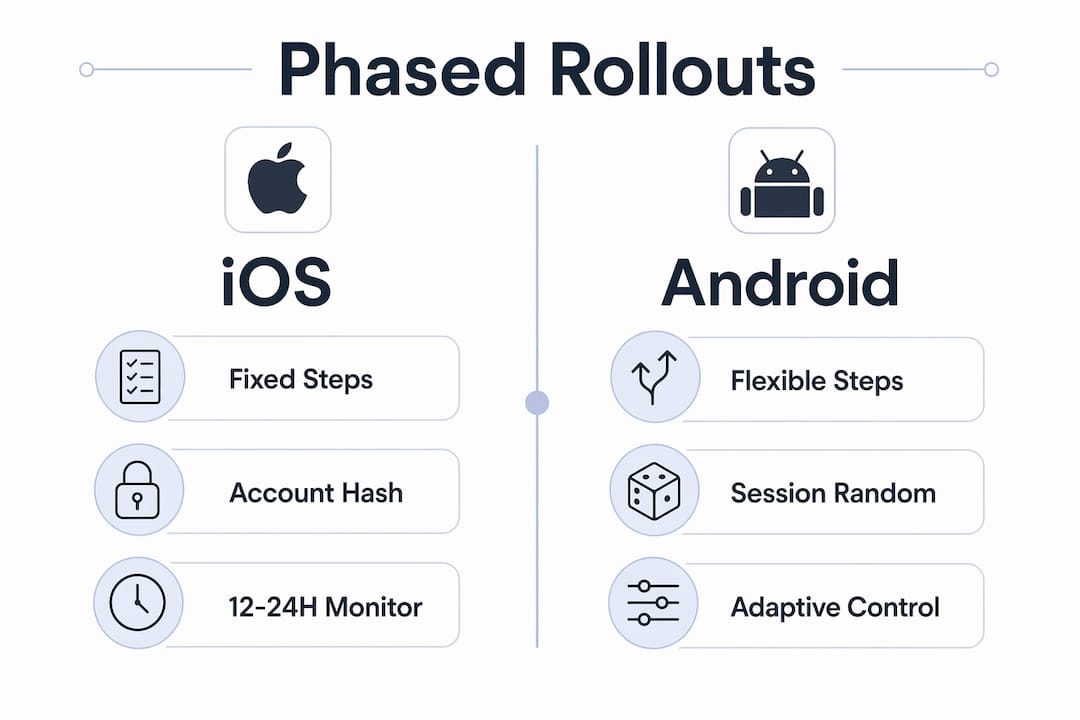
Rollout users are assigned by consistent hashes of their account IDs, not randomly per session. A user in the 10% cohort stays in that cohort for the entire rollout. This prevents users from flipping between the old and new version, which would make crash data unreliable.
The industry standard is to start at 5–10% and monitor stability metrics for 12–24 hours before increasing. Watch Android Vitals for ANR rates and Firebase Crashlytics for crash-free session rates before expanding.
| Capability | iOS phased release | Android staged rollout |
|---|---|---|
| Rollout percentages | Fixed (1%, 2%, 5%, 10%, 20%, 50%, 100%) | Custom, any percentage |
| Manual advancement | Not available | Available |
| Pause capability | Up to 30 days | Unlimited |
| Resume control | Limited | Full |
| Rollback method | Expedited review required | Pull update directly |
Pro Tip: Set an automated halt rule before you start any rollout. Define your crash rate threshold in advance. If the rate crosses that line, the system pauses the rollout without waiting for a human to notice.
What role do OTA updates and expedited reviews play?
Over-the-air (OTA) updates deliver JavaScript or Dart bundles directly to installed apps without going through a store review. Services like Expo EAS Update handle this for React Native and Flutter apps. OTA updates can reach users in minutes rather than days.
The policy boundary is strict. OTA updates must stay within bug fixes and feature toggles to comply with app store rules. Shipping user-visible new features or native code changes via OTA risks removal under Apple Guideline 3.3.1. Engineering and legal teams should sign off on a policy checklist before any OTA deployment.
A three-layer release strategy covers the full risk spectrum:
- Store phased rollout handles major version releases with full QA coverage.
- OTA hotfixes address logic errors and UI bugs between store releases.
- Expedited App Store review covers native crashes that OTA cannot fix.
Store phased releases alone lack instant rollback capability. OTA fills that gap for non-native issues. Expedited review fills it for native crashes. Each layer serves a distinct purpose, and relying on only one creates gaps in your risk coverage.
Pro Tip: Reserve expedited App Store review requests for genuine production emergencies. Apple tracks how often you request them. Overuse reduces the goodwill you need when a real crisis hits.
How should teams handle user communication and update monitoring?
Clear user communication is the most underrated part of managing updates for mobile applications. User-facing messages should explain the update’s purpose, expected duration, and connectivity requirements. A message that says “Update available” tells users nothing. A message that says “This update fixes a login issue and takes about 30 seconds on WiFi” reduces abandonment.
During a staged rollout, your support team is fielding questions from users on two different app versions simultaneously. Poor communication during staged rollouts is the most common cause of user confusion and frustration. Brief your support team before the rollout starts, not after the first complaint arrives.
For monitoring, the strongest setup combines several tools:
- Firebase Crashlytics for real-time crash tracking and version-level breakdowns.
- Sentry for error monitoring with full stack traces and release health dashboards.
- Android Vitals for ANR rates and crash rates reported directly in the Google Play Console.
- Luciq for automated release health monitoring with threshold-based halt triggers.
Automated halt rules tied to stability thresholds stop a bad rollout before it reaches the full user base. Threshold-based policies outperform time-based decisions because they respond to actual data, not a calendar. Set your thresholds before the rollout begins. Adjust them after each release cycle based on what you learn.
The mobile app lifecycle does not end at launch. Post-release monitoring is where you protect the investment you made in development.
Key Takeaways
Effective mobile app update management requires a layered release strategy, automated monitoring, and clear user communication working together across every release cycle.
| Point | Details |
|---|---|
| Use a seven-stage release process | Move from planning through monitoring in sequence; skipping stages creates compounding risk. |
| Automate code signing | Integrate certificate management into your CI/CD pipeline to prevent stalled releases. |
| Layer your release strategy | Combine store rollouts, OTA hotfixes, and expedited reviews to cover every failure scenario. |
| Set automated halt rules | Define crash rate thresholds before rollout begins and let the system pause on your behalf. |
| Communicate updates clearly | Tell users what changed, how long it takes, and what connection they need to reduce abandonment. |
What I’ve learned from watching update strategies fail in the field
The teams that struggle most with mobile releases share one trait: they treat the update process as a deployment task rather than a risk management discipline. They ship, they watch, and they react. The teams that do it well build the monitoring and halt rules before they write the release notes.
The iOS fixed rollout schedule catches developers off guard more than almost anything else. You cannot accelerate it. You cannot skip from 5% to 50% because the metrics look good. That rigidity forces you to invest in OTA for the fast-response layer, which most teams underuse because they are nervous about policy compliance. The policy boundary is actually clear: no new native code, no new user-visible features. Stay inside that line and OTA is one of the most powerful tools in your release toolkit.
The communication gap between engineering and support is where most update crises become customer service disasters. Support teams find out about a staged rollout when users start calling. That is too late. A one-page brief sent to support before rollout starts, covering what changed and what version users might be on, cuts incident volume significantly.
The common mistakes in mobile development that cause the most damage are rarely technical. They are process failures. The fix is almost always the same: define the process, automate the safeguards, and communicate earlier than feels necessary.
— Christopher
How Mediakliq helps teams manage mobile app updates effectively
Managing mobile app releases at scale requires more than good intentions. It requires a defined process, the right tooling, and a team that has done it before.

Mediakliq brings over 100,000 project hours of experience across Flutter, React, and Laravel to every engagement, including full lifecycle support from build pipelines through post-release monitoring. The team handles continuous delivery for mobile apps, phased rollout configuration, and OTA update strategy as part of its standard mobile development practice. If your current update workflow creates bottlenecks or release anxiety, Mediakliq’s mobile development services are built to fix exactly that.
FAQ
What is mobile app update management?
Mobile app update management is the coordinated process of planning, building, testing, deploying, and monitoring app releases across platforms like the Apple App Store and Google Play Store to maintain stability and user engagement.
How are app updates deployed to users?
App updates are deployed through store submissions with phased rollouts, OTA delivery services like Expo EAS Update for non-native fixes, and expedited store reviews for critical native crashes.
What is a phased rollout in mobile app updates?
A phased rollout releases an update to a small percentage of users first, monitors stability metrics like crash rates and ANRs, then expands to the full user base. Android allows custom percentages; iOS follows a fixed seven-day schedule.
How do automated halt rules improve update safety?
Automated halt rules pause a rollout automatically when crash rates or ANR rates cross a predefined threshold. This stops a bad release before it reaches the full user base without requiring manual intervention.
How often should mobile apps be updated?
Apps updated at least monthly retain significantly more users than apps updated quarterly or less. Monthly updates signal active maintenance and give teams regular opportunities to fix issues before they compound.