

AI automation in workflows is defined as the use of artificial intelligence to interpret data, make decisions, and execute multi-step business processes with minimal human intervention. Unlike traditional automation, which follows fixed scripts, AI workflow automation applies to 60–80% of business processes compared to just 20–30% for rule-based systems. That gap represents an enormous operational opportunity for decision-makers. The industry term for this discipline is intelligent process automation, though “AI workflow automation” has become the standard shorthand across enterprise technology. Understanding what is AI automation in workflows is now a baseline requirement for any organization serious about operational efficiency.
What is AI automation in workflows?
AI workflow automation is the practice of using machine learning, natural language processing, decision intelligence, and computer vision to manage entire process sequences without manual handoffs. Each technology plays a distinct role. Machine learning identifies patterns and predicts outcomes. Natural language processing reads and interprets unstructured text, such as emails, contracts, and support tickets. Decision intelligence applies logic to route tasks, flag exceptions, and trigger actions. Computer vision processes images and documents that traditional systems cannot read.
A typical AI workflow contains four components: a trigger that starts the process, an AI processing step that interprets the input, an action that executes the output, and a logging layer that creates an audit trail. This structure is what separates AI workflow automation from simple task automation. The audit trail component is particularly important for regulated industries, where compliance requires a record of every decision made.

AI workflow automation adapts to variable inputs and exceptions, while static scripted automation breaks when inputs change. That adaptability is the core technical advantage. A script fails when an invoice arrives in an unexpected format. An AI system reads the intent, extracts the relevant fields, and routes the document correctly.
AI tasks within a workflow include classification, extraction, summarization, routing, generation, and scoring. Each task type handles a different kind of judgment. Classification sorts inputs into categories. Extraction pulls structured data from unstructured sources. Routing sends tasks to the right destination based on context. Together, these capabilities allow AI to manage processes that previously required a human at every decision point.
Pro Tip: Build workflows around adaptive AI logic from the start. Retrofitting AI onto a scripted process forces the AI to work within constraints that eliminate its core advantage: handling variability.
How does AI automation differ from traditional workflow automation?
Traditional robotic process automation, known as RPA, automates fixed, rule-based tasks by mimicking UI clicks but cannot make decisions or handle unstructured data. RPA is a subset of automation, not a replacement for AI workflow automation. The distinction matters because organizations often invest in RPA expecting broad coverage and then discover its limits when processes involve judgment calls.
| Dimension | Traditional/RPA automation | AI workflow automation |
|---|---|---|
| Input type | Structured, predictable | Structured and unstructured |
| Decision-making | None, follows fixed rules | Interprets context and decides |
| Exception handling | Fails or escalates to human | Resolves most exceptions autonomously |
| Process coverage | 20–30% of business processes | 60–80% of business processes |
| Adaptability | Brittle to input changes | Learns and adjusts over time |
The coverage difference is not marginal. A 20–30% coverage ceiling means the majority of your processes still require manual work. AI workflow automation shifts that ceiling to 60–80%, which changes the economics of operations entirely.
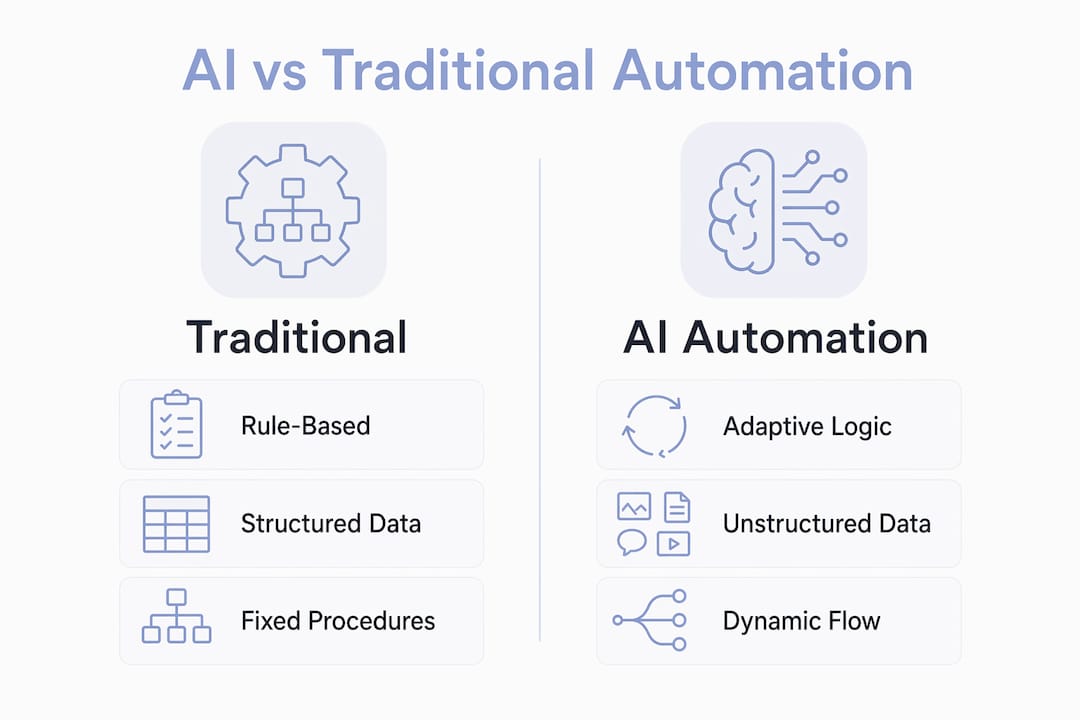
The deeper difference is in how control flow works. Traditional automation follows a fixed procedure, step by step. AI automation applies dynamic decision-making at each step, choosing the next action based on the current state of the process. That shift from fixed procedures to dynamic decision-making is what makes AI workflow automation a fundamentally different category of technology.
What are the operational benefits of AI in workflows?
The business case for AI workflow automation is grounded in measurable outcomes. Early agentic AI workflows deliver up to 3x productivity increases, 80% reduction in cycle time, and over 60% cost savings compared to basic integrations that yield only 10–20% productivity gains. Those numbers come from BCG’s 2026 analysis of organizations that redesigned their operating models around AI. The gap between 10–20% and 3x productivity is not a matter of better tools. It is a matter of process redesign.
The cost of access has also dropped sharply. Language model costs decreased approximately 280-fold over two years, which means AI workflow automation is no longer limited to organizations with large engineering budgets. Mid-market companies can now deploy the same capabilities that were previously available only to technology giants.
The benefits decision-makers should track include:
- Cycle time reduction. Processes that took days complete in hours or minutes when AI handles routing, classification, and decision steps without waiting for human review.
- Cost per transaction. Removing manual steps from high-volume processes cuts the labor cost per unit processed.
- Error rate. AI systems apply consistent logic at every step, eliminating the variability that comes from human fatigue or inconsistent training.
- Throughput capacity. AI workflows scale without adding headcount, which means volume spikes do not create backlogs.
- Audit readiness. Automated logging at every step produces a complete record without additional effort.
Pro Tip: Avoid the trap of deploying AI as a copilot that assists individual workers. Copilot tools produce incremental gains. End-to-end AI workflows produce the 3x productivity improvements that justify the investment.
How should organizations implement AI workflow automation?
The most common implementation failure is treating AI as a plug-in tool rather than redesigning processes end-to-end for agentic AI to manage whole sequences. Organizations that add AI to existing workflows without restructuring them capture a fraction of the available value. The process itself must change, not just the tools running it.
Effective implementation follows a clear sequence:
- Map the full process end-to-end. Identify every step, decision point, and handoff. Do not start with technology. Start with the outcome you want the process to deliver.
- Identify AI-compatible task clusters. Chaining AI-compatible tasks into continuous sequences reduces coordination costs and improves overall system efficiency. Group tasks that AI can handle without human review into uninterrupted sequences.
- Define human-in-the-loop checkpoints. Human oversight remains critical for high-risk or ambiguous decisions. Identify which decisions require human validation and build those checkpoints into the workflow architecture.
- Build governance before scaling. Only 21% of organizations have mature AI agent governance as of 2026. That statistic explains why most AI automation projects stall after initial pilots. Governance means clear ownership of each agent, defined outcome metrics, and integrated audit controls.
- Measure outcomes, not activity. Track cycle time, error rate, and cost per transaction. Activity metrics like “tasks processed” obscure whether the workflow is actually delivering business value.
“Leaders who focus on redesigning the operating system of work rather than incremental AI additions unlock threefold productivity improvements and radically reduce cycle times.” — BCG, 2026
Operations teams are the right owners for this work. Lowered technology costs mean that process experts, not just engineers, can now configure and manage AI workflows. Giving operations teams direct ownership of workflow design produces better outcomes than delegating automation entirely to IT.
Understanding how web app integrations work is also relevant here, since AI workflows typically connect multiple systems and data sources that must exchange information reliably.
Key Takeaways
AI workflow automation delivers transformative operational gains only when organizations redesign processes end-to-end around agentic AI, rather than adding AI tools to existing manual workflows.
| Point | Details |
|---|---|
| Scope advantage | AI workflow automation covers 60–80% of processes versus 20–30% for rule-based systems. |
| Core mechanism | AI interprets unstructured data, makes decisions, and chains tasks without fixed scripts. |
| Measurable impact | End-to-end AI workflows deliver up to 3x productivity gains and 80% cycle time reduction. |
| Governance gap | Only 21% of organizations have mature AI agent governance, which limits scaling success. |
| Implementation priority | Redesign processes around outcomes first. Add AI to the redesigned structure, not the old one. |
The governance problem no one talks about enough
The conversation around AI workflow automation focuses heavily on productivity numbers and technology capabilities. The governance problem gets far less attention, and that is exactly why most implementations underperform.
I have seen organizations deploy capable AI systems that produce inconsistent results within six months. The technology was not the problem. The absence of clear ownership was. When no one is accountable for what an AI agent decides, errors compound quietly until they surface as a compliance issue or a customer complaint. The BCG finding that only 21% of companies have mature AI governance does not surprise me. Building governance structures is unglamorous work. It does not generate the same excitement as deploying a new AI model.
My view is that AI workflow automation should be treated as a core operating layer, not a project. Projects have end dates. Operating layers require ongoing ownership, measurement, and adjustment. Organizations that treat AI automation as a project ship it, celebrate the launch, and then watch performance drift as the business changes around a static system.
The practical advice I give decision-makers is this: assign a named owner to every AI workflow before it goes live. That person is responsible for outcome metrics, not just uptime. Pair every high-volume AI workflow with a human review checkpoint for the edge cases the system flags as uncertain. That combination of clear ownership and structured human oversight is what separates the 21% who scale successfully from the majority who stall.
— Christopher
Mediakliq’s approach to AI workflow automation
Mediakliq builds AI-driven workflow solutions for organizations that need more than off-the-shelf automation. With over 75 completed projects and more than 100,000 project hours, Mediakliq covers the full lifecycle from process design through deployment and ongoing maintenance.

The team works with technologies including React, Flutter, and Laravel to build integrated platforms that connect AI decision layers with existing business systems. Every solution includes audit trail architecture and governance controls built in from the start, not added later. For decision-makers ready to move from isolated AI tools to end-to-end workflow automation, Mediakliq’s services provide the technical foundation and process expertise to do it at scale.
FAQ
What is AI automation in workflows?
AI automation in workflows is the use of artificial intelligence to interpret data, make decisions, and execute multi-step business processes with minimal human intervention. It applies to 60–80% of business processes, far exceeding the 20–30% coverage of traditional rule-based automation.
How does AI workflow automation differ from RPA?
RPA mimics UI clicks to automate fixed, structured tasks but cannot handle unstructured data or make decisions. AI workflow automation interprets variable inputs, resolves exceptions, and adapts to changing conditions that would break a scripted RPA process.
What are the main benefits of AI in workflows?
The primary benefits include up to 3x productivity increases, 80% reduction in cycle time, and over 60% cost savings compared to basic automation integrations. These gains require end-to-end process redesign, not just adding AI tools to existing workflows.
Why do AI workflow automation projects fail?
The most common failure is treating AI as an add-on to existing processes rather than redesigning workflows end-to-end for agentic AI. Poor governance, undefined ownership, and lack of outcome measurement also cause implementations to stall after initial pilots.
What role do humans play in AI workflow automation?
Humans remain responsible for high-risk and ambiguous decisions within AI workflows. Effective implementations include human-in-the-loop checkpoints for edge cases and maintain continuous auditing to catch errors before they propagate through the system.