

React is a JavaScript library that builds user interfaces through a component tree, a virtual DOM, and a two-phase rendering pipeline that minimizes costly direct DOM manipulation. Understanding how React web applications work reveals why the library handles complex, interactive UIs so efficiently. React’s internal architecture, specifically the Fiber reconciler introduced to replace the original stack-based renderer, and the lane-based scheduler added in React 18, gives developers precise control over update priority and rendering performance. This guide breaks down each layer of that architecture so you can write better code and debug with confidence.
How does react’s rendering process update the DOM?
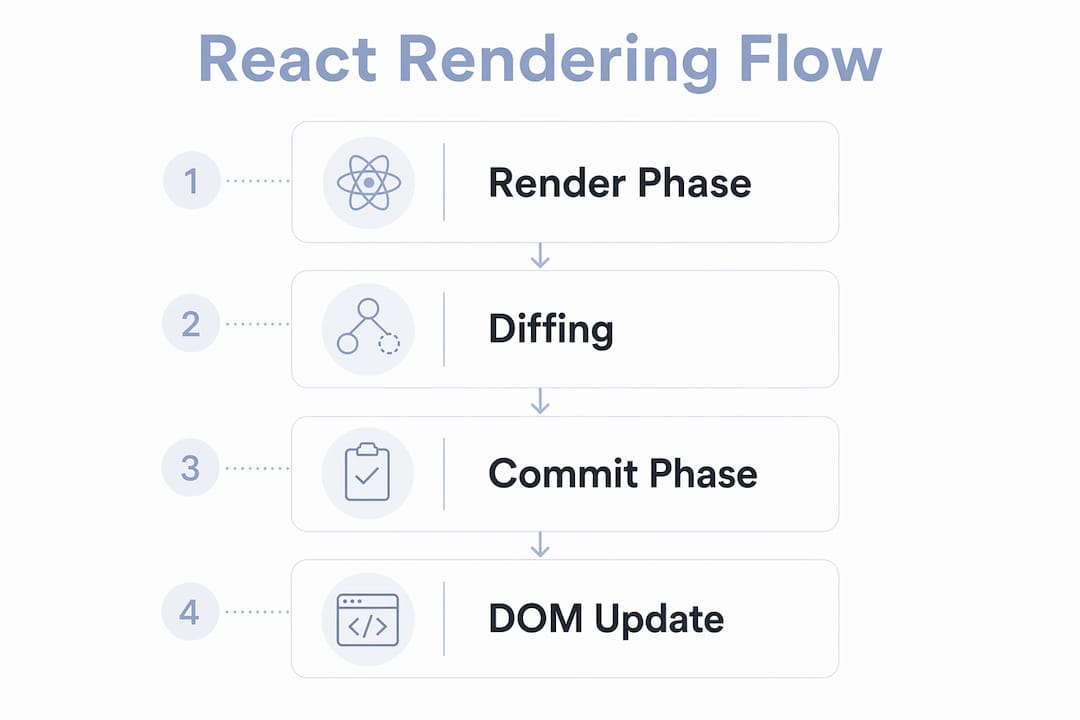
React rendering involves a two-phase pipeline: a render phase that computes changes without touching the DOM, and a commit phase that applies those changes to the actual DOM atomically. This separation is the core reason React feels fast. Expensive JavaScript computations happen first, and the browser only repaints once React has a complete picture of what needs to change.
Here is the sequence React follows on every update:
- Trigger: A state change, prop update, or context change signals React that a component needs re-evaluation.
- Render phase: React calls your component functions and builds a new virtual DOM tree. No DOM mutations happen here.
- Reconciliation: React diffs the new virtual DOM against the previous one to find the minimum set of changes.
- Commit phase: React applies those changes to the real DOM in a single, synchronous pass and runs side effects.
- Browser paint: The browser reads the updated DOM and repaints the screen.
One critical distinction trips up many developers: re-rendering a component does not always mean the DOM changes. If the new virtual DOM output matches the previous one, React skips the commit phase entirely. That is a free performance win built into the model.
React automatically batches multiple updates of the same priority into a single render pass. Since React 18, this batching applies even to updates inside setTimeout and native event handlers, not just React synthetic events.
Pro Tip: Use React DevTools Profiler to record which components re-render on each interaction. You will often find components re-rendering with identical output, which signals a good candidate for React.memo or useMemo.
How does react’s fiber architecture power reconciliation?
React’s reconciliation engine was rewritten as Fiber to enable incremental rendering and update prioritization. Before Fiber, React used a recursive call stack that could not be interrupted. A large update would block the main thread until it finished, causing dropped frames and janky UIs.

Fiber solves this by treating each component instance as a node in a linked list called the fiber tree. Each node is a unit of work that React can pause, resume, or abandon. Think of it as React maintaining its own virtual call stack in JavaScript, giving it full control over scheduling.
The reconciliation algorithm uses two heuristics to diff virtual DOM trees efficiently. First, elements of different types produce entirely different trees, so React tears down the old tree and builds a new one rather than trying to patch it. Second, developers can provide a key prop on list items to help React identify which items moved, were added, or were removed without comparing every node.
| Feature | Old Stack Reconciler | Fiber Reconciler |
|---|---|---|
| Rendering model | Synchronous, recursive | Incremental, interruptible |
| Update prioritization | None | Lane-based priority system |
| Error boundaries | Not supported | Supported |
| Concurrent mode | Not possible | Foundation for React 18+ |
| Large tree performance | Blocking | Non-blocking with scheduling |
Fiber’s architecture applies consistently across client-side rendering, server-side rendering, and React Server Components. The execution environment changes, but the reconciliation concepts remain the same. That consistency makes React’s mental model transferable across rendering targets.
Pro Tip: When profiling a slow React app, check whether a single component is doing too much work in one render. Fiber can pause between components, but it cannot pause inside a single component’s render function. Keep component logic lean.
What are react’s concurrent rendering and lane-based scheduling mechanisms?
React 18 introduces concurrent rendering with a lane-based scheduling system where every update is tagged with a priority lane. Lanes are a bitmask, meaning React can represent multiple active priorities simultaneously using bitwise operations. The scheduler processes lanes from highest to lowest priority on each work loop iteration.
The practical impact is significant. Here is how lanes map to real update types:
- Discrete input lanes: Button clicks, keyboard events. Processed immediately because users expect instant feedback.
- Continuous input lanes: Mouse movement, scroll events. Slightly lower priority since a few missed frames are less noticeable.
- Transition lanes: Non-urgent UI updates triggered by
startTransition. Can be interrupted by higher-priority work. - Idle lanes: Background prefetching and speculative rendering. Processed only when the main thread is free.
React’s scheduler allows high-priority updates like discrete input to preempt long-running transition updates. If a user types in a search field while a large list is rendering, React pauses the list render, processes the keystroke, and then resumes the list. The user never notices the list work happening in the background.
The render phase can be interrupted in concurrent mode, but the commit phase is always synchronous and uninterruptible. React never commits a partial UI to the DOM. This guarantees visual consistency even when rendering is spread across multiple frames.
How do react single page applications boot and render in the browser?
A React application typically works as a Single Page Application where the server returns a minimal HTML shell containing a root <div> element and script tags. The browser then fetches and executes the JavaScript bundles to bootstrap React and mount the component tree.
The boot sequence looks like this:
- The browser requests a URL and receives an HTML file with an empty root container, usually
<div id="root"></div>. - The browser downloads the JavaScript bundle, which includes React, ReactDOM, and your application code.
- ReactDOM calls
createRooton the root container and thenrenderto kick off the first render pass. - React builds the virtual DOM from your component tree and commits the first paint to the real DOM.
- After the first paint, React runs
useEffectcallbacks and sets up event listeners.
Bundlers like Vite and webpack play a critical role here. They split your code into smaller chunks so the browser only downloads what it needs for the current route. This technique, called code splitting, directly reduces time to first paint.
| Boot Stage | What Happens | Performance Impact |
|---|---|---|
| HTML shell received | Browser parses minimal HTML | Fast; no JavaScript yet |
| Bundle download | JS fetched over network | Largest latency bottleneck |
| React bootstrap | createRoot and first render |
CPU-bound; depends on tree size |
| First paint committed | Real DOM updated | User sees content |
| Effects run | useEffect callbacks fire |
Network requests, subscriptions |
For high-performance web applications, server-side rendering with Next.js or Remix sends a pre-rendered HTML response instead of an empty shell. React then hydrates the existing HTML, attaching event listeners without rebuilding the DOM from scratch.
React vs other frontend frameworks: what makes react’s architecture unique?
React’s architecture differs from other popular frontend frameworks in three concrete ways: its virtual DOM abstraction, its one-way data flow, and its concurrent rendering model.
Angular uses a zone-based change detection system that patches browser APIs to detect any asynchronous operation and trigger a full component tree check. Vue uses a reactive proxy system that tracks property access at a fine-grained level and updates only the components that depend on changed data. React takes a different approach. React treats rendering as the computation of a UI description from state, committing only the minimal necessary DOM changes afterward. This makes React’s update model explicit and predictable rather than automatic.
| Dimension | React | Vue | Angular |
|---|---|---|---|
| Change detection | Virtual DOM diffing | Reactive proxies | Zone-based dirty checking |
| Data flow | One-way (state to UI) | Two-way option available | Two-way with ngModel |
| Rendering model | Concurrent, interruptible | Synchronous by default | Synchronous by default |
| Architecture scope | Library (UI only) | Progressive framework | Full framework |
| Concurrent updates | Yes, via lanes | Limited | No native equivalent |
React’s one-way data flow from state to UI makes behavior predictable and manageable in complex interactive applications. When a bug appears, you trace it upstream through props and state rather than hunting through two-way bindings that can update from multiple directions.
React’s concurrent mode has no direct equivalent in Vue or Angular today. The ability to interrupt rendering and prioritize urgent updates is a structural advantage for applications with heavy data processing alongside user interaction, such as data dashboards, collaborative editors, and real-time feeds. Pairing React with responsive design practices and solid UX principles produces interfaces that feel native-quality on any device.
Key takeaways
React web applications achieve fast, interactive UIs by separating rendering computation from DOM mutation, using Fiber for interruptible work, and scheduling updates by priority through lanes.
| Point | Details |
|---|---|
| Two-phase rendering | React computes changes in the render phase and applies them atomically in the commit phase. |
| Fiber reconciler | Fiber breaks rendering into pausable units, enabling concurrent mode and error boundaries. |
| Lane-based scheduling | React 18 tags updates with priority lanes so urgent interactions preempt background work. |
| SPA boot sequence | React mounts from an HTML shell after the JavaScript bundle downloads and executes. |
| One-way data flow | State flows down through props, making complex UI behavior traceable and predictable. |
Why most developers miss the most important part of react
Most React tutorials teach you JSX, hooks, and component composition. Very few explain what actually happens between a setState call and a pixel changing on screen. That gap is where most performance bugs live.
I have spent years reviewing React codebases, and the most common mistake is treating re-renders as equivalent to DOM updates. Developers add useMemo and React.memo everywhere because they assume every re-render is expensive. But React can re-render a component without touching the DOM at all if the output is unchanged. Premature memoization adds complexity without measurable benefit.
The render versus commit distinction matters more than most developers realize. useLayoutEffect runs synchronously before the browser paints, while useEffect runs after. Getting that order wrong causes visual flickers that are nearly impossible to debug without knowing the commit phase timing. Once you internalize the pipeline, those bugs become obvious.
Concurrent features like startTransition and useDeferredValue are underused because they feel abstract. But they solve a real problem: keeping the UI responsive while React processes large updates. Use them anywhere you have a user input driving a computationally expensive render, like a search field filtering thousands of rows. The improvement in perceived performance is immediate and requires no backend changes.
React’s architecture will keep evolving. React Server Components shift rendering work to the server while preserving client interactivity where needed. Understanding the Fiber model and lane scheduling now gives you the foundation to adopt those features without confusion when your project demands them.
— Christopher
Build high-performance react apps with Mediakliq
If you are moving from understanding React’s internals to shipping production-grade applications, the architecture decisions get harder fast. Choosing the right rendering strategy, managing state at scale, and keeping bundle sizes under control all require experience beyond what documentation covers.

Mediakliq specializes in React web development for businesses that need interactive, high-performance applications built to last. With over 75 completed projects and more than 100,000 project hours, the team handles the full lifecycle from architecture to deployment. Whether you are building a data-heavy dashboard, a real-time collaboration tool, or a consumer-facing SPA, Mediakliq brings the technical depth to get it right. Explore scalable web app stacks to see how React fits into a production-ready technology strategy.
FAQ
What is the virtual DOM in react?
The virtual DOM is a JavaScript object tree that mirrors the real DOM structure. React diffs the new virtual DOM against the previous version to compute the minimum set of real DOM changes needed.
How does react’s fiber architecture improve performance?
Fiber breaks rendering into small units of work that can be paused and resumed. This prevents large updates from blocking the main thread and forms the foundation for React 18’s concurrent rendering features.
What are react lanes and why do they matter?
Lanes are a bitmask system React uses to assign priority to updates. Discrete user input gets the highest priority, while background transitions get lower priority, keeping the UI responsive during heavy work.
Does re-rendering always update the DOM?
No. React can call a component function and produce an identical virtual DOM output, in which case the commit phase is skipped entirely and no DOM mutation occurs.
How is react different from a full framework like angular?
React is a UI library focused on rendering and state. Angular is a full framework with built-in routing, forms, and dependency injection. React’s virtual DOM and concurrent scheduler give it a distinct performance model compared to Angular’s zone-based change detection.